



Why Does Thermal Paper Turn Black?
Thermal paper is commonly used in retail, healthcare, logistics, and various other industries. It’s become increasingly popular across various industries due to its efficiency, cost-effectiveness, and the convenience it offers for printing receipts, labels, and tickets, without the need for ink or ribbons. However, many businesses and individuals have encountered the frustrating problem of thermal paper turning black. This issue can be both perplexing and costly, as it can lead to unreadable receipts and labels, which are essential for smooth operations. So, why does thermal paper turn black? And, more importantly, how can you prevent it?
Thermal paper turns black due to heat exposure, UV light, pressure, or improper storage. To prevent blackening, store paper in cool, dry, and dark conditions, away from heat sources. Handle carefully to avoid friction and make sure to invest in high-quality thermal paper for longer-lasting, clear prints.
In this post, we will explore what causes this phenomenon, and how you can take the necessary steps to protect your thermal paper and maintain its quality for longer. Whether you’re using thermal paper for your business or personal needs, this guide will help you better understand how to care for this vital resource.
What Is Thermal Paper?
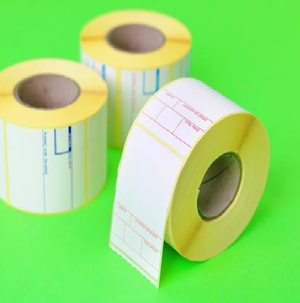
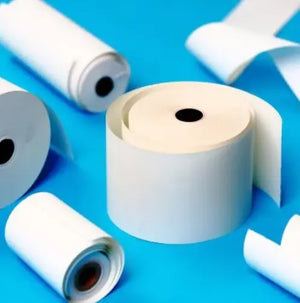
Before we dive into why thermal paper turns black, it’s essential to understand what it is. Thermal paper is a type of paper that is coated with a special chemical that changes colour when heat is applied. This heat-sensitive coating reacts to the heat generated by thermal printers, which allows for the printing of text or images without the need for ink.
Thermal paper is used in various industries for printing receipts, labels, tickets, and even labels for pharmaceuticals and medical devices. It is valued for its efficiency and eco-friendly nature, as it eliminates the need for ink or toner cartridges.
Thermal printing is faster, quieter, and requires less maintenance than traditional ink-based printers, making it an ideal solution for high-volume printing. However, it’s also more vulnerable to environmental conditions, which can lead to the paper changing colour, especially turning black.
How Does Thermal Paper Work?
To understand why thermal paper turns black, it's helpful to first explain how it works. As mentioned, thermal paper contains a heat-sensitive coating. When a thermal printer’s printhead heats the paper, the chemicals in the coating react by changing colour, usually producing a black image or text.
The process of thermal printing is quite efficient. The printer’s printhead heats up in small areas to create the desired image, whether it’s text, a barcode, or a logo. This method of printing doesn’t require any ink or ribbons, making it an attractive option for businesses looking to cut down on costs and reduce waste.
The result is a clean, crisp print that doesn’t smudge or fade easily – at least when the paper is stored properly.
What Causes Thermal Paper to Turn Black?
While thermal paper works brilliantly in the right conditions, it’s sensitive to environmental factors. Over time, if exposed to certain elements, thermal paper can begin to turn black or fade altogether. Below are the primary causes of this blackening effect:
1. Heat Exposure
The most common reason thermal paper turns black is exposure to heat. Heat-sensitive chemicals in the paper react when they come into contact with high temperatures. If thermal paper is stored or exposed to excess heat, it can cause the entire sheet to blacken.
This can happen if the paper is left in a hot vehicle or near a heat source such as a radiator or direct sunlight. Thermal printers also use heat to print, but this process is controlled and precise. Prolonged or uncontrolled exposure to heat, however, accelerates the chemical reaction, causing the paper to darken.
2. Direct Sunlight Exposure
Ultraviolet (UV) light from the sun can also cause thermal paper to turn black. UV rays affect the sensitive coating on thermal paper, causing it to react and change colour. Even a short period of direct sunlight exposure can lead to visible darkening, especially if the thermal paper is left out for extended periods.
3. Pressure or Friction
Thermal paper is prone to darkening if it undergoes too much pressure or friction. Pressing the paper too hard or rubbing it with force can cause the chemicals to react and turn black. This is especially true for receipts and labels that are handled frequently or stored improperly.
For example, if receipts are crumpled up or placed in a bag with other items, the friction can lead to dark streaks or patches appearing on the thermal paper. Always handle the paper gently to avoid this issue.
4. Improper Storage Conditions
Improper storage is another major cause of thermal paper turning black. Storing thermal paper in a warm, humid, or poorly ventilated area accelerates the chemical reaction, leading to darkening. Excess moisture in the air can also affect the coating and lead to a change in colour.
To ensure that your thermal paper stays in good condition, it should be stored in a cool, dry, and dark place. Additionally, avoid stacking paper too high, as pressure from the weight can affect the paper's integrity.
How to Prevent Thermal Paper from Turning Black
While you can't always prevent the inevitable, there are several steps you can take to protect your thermal paper and extend its shelf life:
1. Store Thermal Paper Properly
The most important step in preserving thermal paper is proper storage. Keep thermal paper in a cool, dry, and dark place away from any sources of heat or sunlight. A temperature-controlled environment is ideal, and paper should be kept away from windows or areas where it could be exposed to direct sunlight.
2. Avoid Excessive Heat
Thermal paper should never be exposed to high temperatures. Avoid storing it near heat sources like radiators, stoves, or in a hot car. If you need to store thermal paper for a long time, ensure that it is kept in an air-conditioned environment to prevent exposure to heat.
3. Handle with Care
To avoid friction and pressure that could cause the paper to turn black, always handle thermal paper carefully. Avoid crumpling or folding receipts and labels, and store them in protective sleeves if possible. When printing, make sure that the print head is properly aligned and that there is no excessive pressure on the paper during the printing process.
4. Use Protective Covers
If your thermal paper is stored in environments where it could be exposed to heat or sunlight, consider using protective covers or envelopes. These can protect the paper from UV rays and keep it safe from heat and friction.
5. Buy High-Quality Thermal Paper
Not all thermal paper is created equal. Investing in high-quality thermal paper from trusted suppliers like Price Gun Land ensures that you are getting a product that is less likely to react to environmental factors. Cheap or subpar thermal paper may be more prone to fading or blackening over time.
What to Do If Thermal Paper Turns Black?
If your thermal paper has already turned black, the best course of action is to replace it. Unfortunately, once the chemical reaction has occurred, it’s irreversible. It’s essential to act quickly and contact your supplier for a replacement roll or sheet of thermal paper.
We offer a range of high-quality thermal paper products designed to withstand the elements and stay crisp for longer. If your paper has been damaged due to improper storage or exposure to heat, we can help you find a better alternative.
What Is the Cost of Thermal Paper?
When considering thermal paper for your business or personal use, one important factor to keep in mind is cost. Thermal paper prices can vary depending on factors such as quality, brand, and the quantity you purchase. While cheaper options may seem attractive upfront, they often come with a higher risk of blackening, fading, or poor print quality. In contrast, investing in high-quality thermal paper ensures long-lasting prints, fewer replacements, and better overall performance.
Choose High-Quality Thermal Paper from Price Gun Land
Thermal paper turning black is a common issue that many businesses face, but it can be prevented with proper storage, handling, and care. Heat exposure, direct sunlight, pressure, and improper storage conditions are the main culprits behind blackening thermal paper. By following the tips outlined above, you can extend the lifespan of your thermal paper and keep your prints clear and readable.
If you're in need of high-quality thermal paper for your business, look no further than Price Gun Land. We provide reliable, long-lasting thermal paper that is designed to resist blackening and deliver consistent results. Visit our website today to explore our range of thermal paper products and ensure that your business operations run smoothly.